
We’re excited to announce the launch of Bulk Cleanup for WooCommerce, a new plugin from StackWC built to help store owners clean up their WooCommerce database safely, in bulk, and on autopilot.
Today marks the official launch, now available on the WooCommerce Marketplace. It’s built for one purpose: giving store owners an easy, safe way to clear out the orders, users, products, coupons, and reviews that quietly pile up over time without touching the database directly or deleting things one by one from the admin.
Why We Built It
Every WooCommerce store accumulates data it doesn’t need to keep. Checkout drafts that never converted. Guest orders from months ago. Customer accounts that never placed an order. Coupons that expired years back. None of it adds value, but all of it adds weight and over time, that buildup slows down admin screens, bloats backups, and makes the store harder to manage.
We kept hearing the same thing from store owners and agencies: there wasn’t a straightforward, safe way to clean this up in bulk. The existing options meant custom SQL, one-by-one deletion, or tools that didn’t give enough visibility before something got deleted for good. Bulk Cleanup was built to close that gap.
What’s Inside Bulk Cleanup
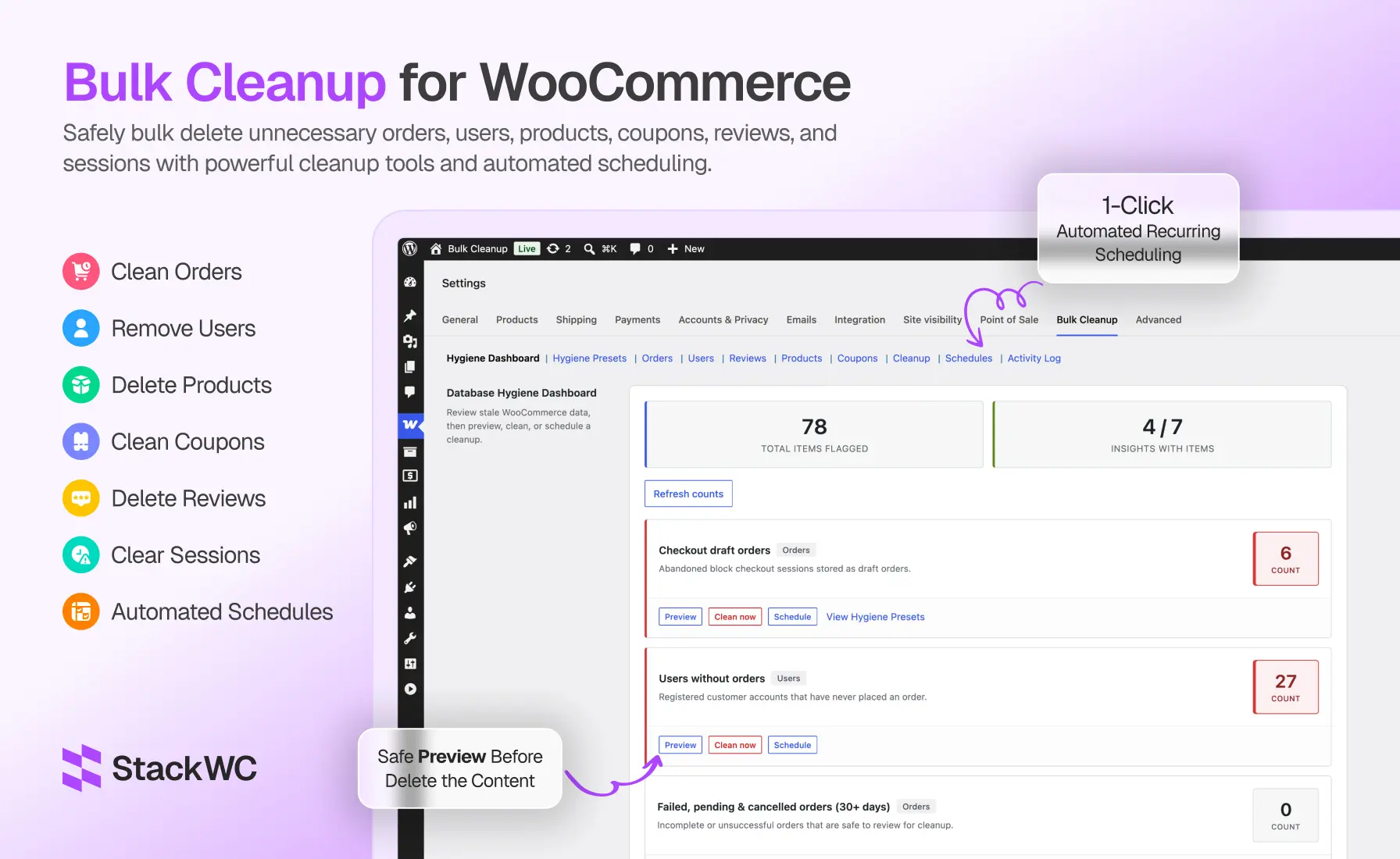
Hygiene Dashboard: See what’s piling up before you touch anything. Live counts for checkout-draft orders, failed/pending/cancelled orders (30+ days), guest orders (90+ days), trashed orders, expired cart sessions, expired coupons, and users without orders each with its own Preview, Clean Now, or Schedule option.
Hygiene Presets: Ready-made recurring cleanup policies you can turn on with one click: weekly draft-order cleanup, daily expired session cleanup, monthly failed/pending/cancelled order cleanup, weekly trash emptying, monthly guest order cleanup, and monthly expired coupon cleanup. Applying a preset creates a scheduled job automatically.
Targeted bulk cleanup, by entity type
- Orders filter by status, date range, order total, and payment method; move to trash or delete permanently
- Users filter by role, registration date, email, or user meta; reassign orders before deletion; admins and your own account are always protected
- Products filter by status, type, category, stock status, SKU, and date range
- Coupons target expired coupons, unused coupons, or both, filtered by discount type or code
- Reviews filter by rating, status, date, product, or author
- Cart sessions clear expired WooCommerce sessions in one click
Every one of these supports preview before delete and CSV export (up to 5,000 rows) as a backup.
Scheduling: Turn any cleanup action into a one-time or recurring job hourly, daily, weekly, or monthly with configurable batch sizes and optional email notifications when a job completes.
Safety built in: Preview and confirmation before every destructive action, the option to trash instead of permanently delete, CSV export before you remove anything, and a full Activity Log tracking every manual and scheduled deletion who did what, when, and how many items.
Bulk Cleanup is also fully compatible with WooCommerce’s High-Performance Order Storage (HPOS), so it works whether your store is on legacy order storage or the newer custom order tables.
How It Works
- Install and activate Bulk Cleanup (WooCommerce required).
- Head to WooCommerce → Settings → Bulk Cleanup.
- Open the Hygiene Dashboard and refresh counts to see what’s accumulated.
- Preview anything with a high count, export a CSV if you want a backup, then clean up now or apply a preset for ongoing automation.
Who It’s For
- Stores with years of accumulated order history
- Shops running block checkout, where draft orders build up fast
- Stores with large, aging customer databases
- Agencies managing database hygiene across multiple client stores
- High-traffic stores where manual, one-by-one cleanup isn’t realistic
Pricing and Availability
Bulk Cleanup for WooCommerce is available now on the WooCommerce Marketplace, starting at $49/year. Every plan includes product updates, customer support, and a 30-day money-back guarantee.
Frequently Asked Questions
Can I bulk delete WooCommerce orders safely? Yes. Every order deletion includes a preview step, confirmation prompt, optional move-to-trash (reversible), and CSV export, with batch processing for large stores and a full record in the Activity Log.
Does Bulk Cleanup support scheduled cleanup? Yes. Create one-time or recurring jobs hourly, daily, weekly, or monthly from any tab, or apply a Hygiene Preset to turn on recurring cleanup instantly.
Can I delete customers who never placed an order? Yes, using the Users tab with “users without orders” enabled, the dedicated cleanup tool, or the Hygiene Dashboard insight. Administrators and your own logged-in account are always protected from deletion.
Is Bulk Cleanup safe for large stores? Yes. It uses batch processing with progress indicators, supports CSV export up to 5,000 rows per action, and is fully compatible with HPOS.
Get Started
Bulk Cleanup for WooCommerce is live now on the WooCommerce Marketplace. If your store has been running for a while and you’ve never done a proper database cleanup, this is a good time to start.
Get Bulk Cleanup for WooCommerce →
You can also browse the rest of our WooCommerce plugins on the StackWC plugins page.