
Introduction
Product reviews are one of the best trust signals a WooCommerce store can have, but they don’t stay clean on their own. Spam bots, duplicate submissions, one-word “reviews,” and outdated feedback on discontinued products can pile up fast and moderating them one by one from the WordPress comments screen gets old quickly.
If you’ve ever scrolled through pages of pending reviews wondering whether there’s a faster way, this guide walks you through exactly how to bulk delete or moderate WooCommerce product reviews, using both WordPress’s built-in tools and a dedicated plugin for larger
Why WooCommerce Review Cleanup Matters
WooCommerce product reviews are stored as a special type of WordPress comment, which means they inherit all the same spam and moderation quirks as blog comments. Left unchecked, a store can accumulate:
- Spam reviews from bots targeting the comment form
- Duplicate or test reviews left during development
- Reviews on products that have since been deleted or discontinued
- Genuine but outdated reviews that no longer reflect the current product
A cluttered reviews list doesn’t just look unprofessional to shoppers it also adds unnecessary rows to your wp_comments and wp_commentmeta tables, which can slow down admin queries as your store grows. Regular review cleanup keeps both your storefront and your database in good shape.
Where WooCommerce Reviews Actually Live
Before bulk deleting anything, it helps to understand where reviews are managed. WooCommerce reviews show up in two places:
- WordPress → Comments: This is the master list of all comments, including product reviews, and supports native bulk actions.
- WooCommerce → Products → [Product] → Reviews tab: A per-product view, useful for spot-checking but not efficient for large-scale cleanup.
For anything beyond a handful of reviews, the Comments screen (or a dedicated plugin) is the more practical starting point.
Bulk Delete Reviews by Filter with a Plugin
If your store has accumulated reviews across many products, categories, or date ranges, filtering and clicking through the Comments screen page by page isn’t practical. This is where a dedicated cleanup plugin comes in, since it lets you target reviews by rating, status, date, or product instead of handling them one page at a time.
Bulk Cleanup for WooCommerce includes a dedicated Reviews tab alongside its order, product, coupon, and user cleanup tools. Here’s how the workflow typically looks:
Step 1: Install and Activate
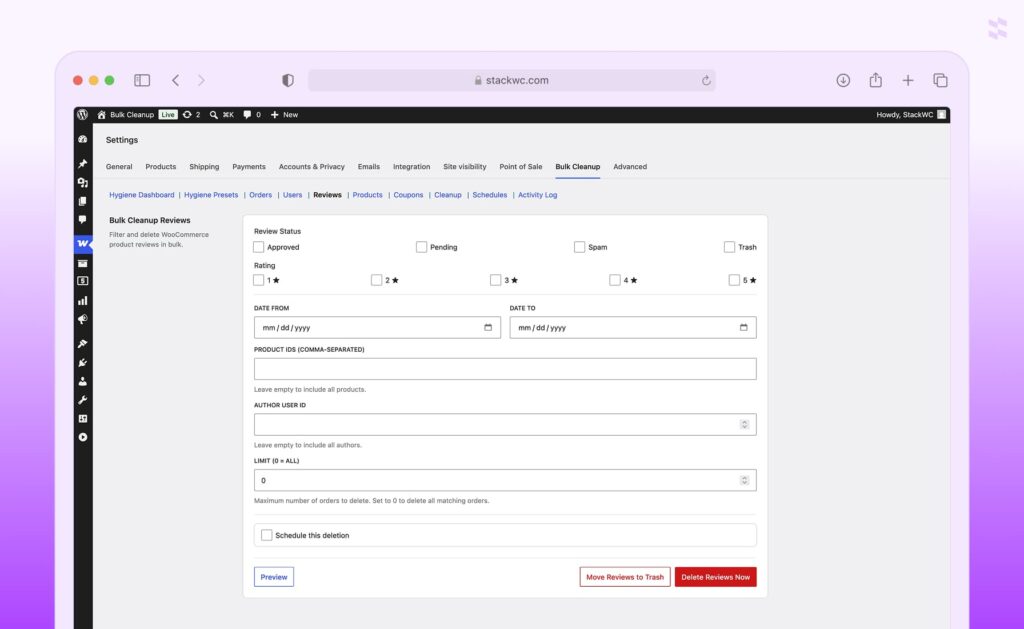
Install the plugin and go to WooCommerce → Settings → Bulk Cleanup, where you’ll find a Reviews sub-tab among the others.
Step 2: Check the Hygiene Dashboard
Before touching anything, the Hygiene Dashboard gives you a live count of flagged items across your store, including reviews that match common cleanup criteria so you know the scale of what you’re dealing with before deleting.
Step 3: Filter Reviews
Use the Reviews tab to filter by criteria such as rating, approval status, product, or submission date. This lets you isolate, for example, only spam-flagged reviews or only reviews left on products you’ve since discontinued.
Step 4: Preview Before Deleting
Run a preview of the matched reviews so you can confirm the filter caught the right set before anything is removed an important safeguard against accidentally deleting genuine customer feedback.
Step 5: Clean Now or Schedule
Once you’re confident in the filtered results, you can clean them up immediately or set up a recurring schedule (hourly, daily, weekly, or monthly) so spam reviews get cleared automatically going forward, without you needing to check back manually.
Best Practices Before You Bulk Delete Reviews
- Export or back up first. Even soft-deleted reviews can be hard to recover if you later realize a genuine review was caught in your filter.
- Distinguish spam from low ratings. A one-star review isn’t automatically spam moderate based on content quality, not just the score.
- Clean up after product changes. When a product is discontinued or replaced, its old reviews are a good candidate for archiving rather than leaving them orphaned.
- Set a recurring cadence. Rather than doing a big cleanup once a year, smaller and more frequent passes keep the reviews list manageable.
If you’re also dealing with database bloat elsewhere in your store, it’s worth pairing review cleanup with a broader routine our guide on bulk deleting WooCommerce orders and our post on removing WooCommerce customers without orders cover two other common sources of clutter. If coupons are part of your cleanup routine too, see our guide on bulk deleting expired and unused WooCommerce coupons.
FAQ
Yes. WooCommerce recalculates the average rating and review count whenever a review is deleted or unapproved, so removing spam or outdated reviews will adjust the displayed rating.
If you use “Move to Trash,” the review is recoverable for about 30 days before WordPress removes it permanently. Permanent deletion cannot be undone.
Removing genuinely spammy or low-quality reviews generally has a neutral or positive effect, since search engines don’t reward keyword-stuffed or bot-generated content. Just be careful not to remove legitimate customer feedback, which does contribute positively to product page SEO.
Yes combining WordPress’s built-in comment moderation settings with a scheduled cleanup rule (as covered in Method 2) lets spam get filtered and removed automatically without ongoing manual review.
Not necessarily. If you’re only dealing with a handful of reviews occasionally, the native Comments screen bulk actions are usually enough. A plugin becomes more useful once you’re managing reviews across many products or want scheduled, filter-based cleanup.
Conclusion
Keeping your WooCommerce reviews clean doesn’t have to mean hours of manual moderation. For occasional cleanup, the built-in WordPress Comments screen handles the basics just fine. But once your store has enough products and enough history that reviews start piling up across categories, ratings, and dates, a filter-based plugin approach saves real time and reduces the risk of missing something in a long, unfiltered list. Whichever method you choose, a regular cleanup cadence keeps your storefront trustworthy and your database lean.