
If you run a WooCommerce store for any length of time, you eventually hit the same wall: something needs to change across hundreds (or thousands) of records, and there’s no clean way to do it without opening each one by hand. A rebrand. A domain migration. A SKU prefix that no longer makes sense. WooCommerce doesn’t give you a built-in way to find and fix these things in bulk so most store owners either live with the mess or reach for a risky database plugin.
We built Bulk Search & Replace for WooCommerce to close that gap, and it’s now available on the WooCommerce Marketplace.
What Bulk Search & Replace Does
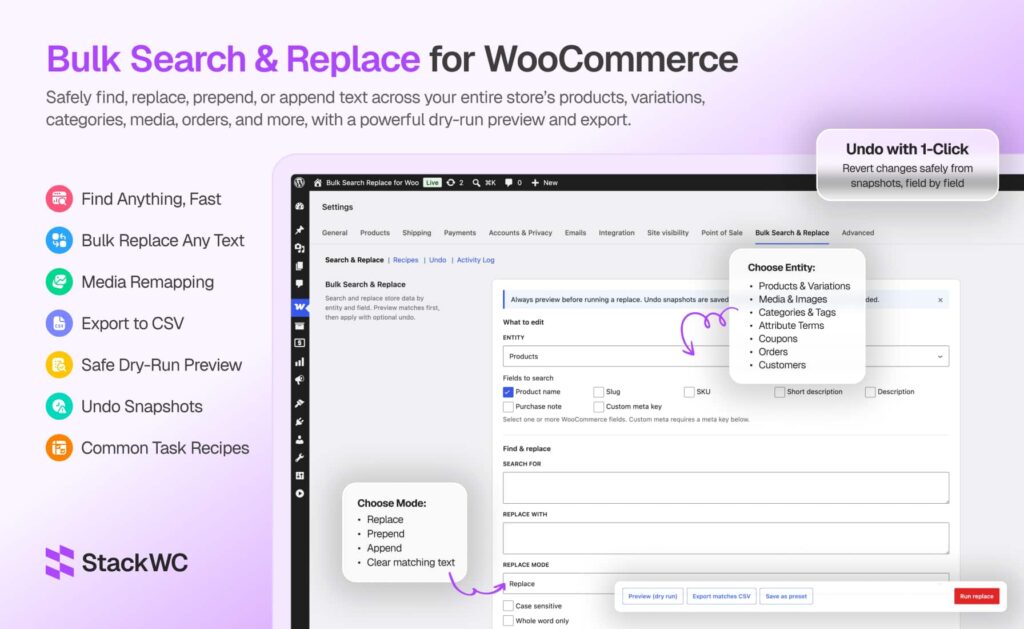
Bulk Search & Replace lets you find and update text across your entire WooCommerce store products, variations, media, categories, attributes, coupons, orders, and customers from one screen. Instead of editing records one at a time, you set up a search, preview exactly what will change, and apply the update to every matching item in a single job.
Every change goes through WooCommerce’s own APIs, not raw database queries, so serialized product meta, variations, and order data stay intact.
Why We Built It
We kept seeing the same requests in store-owner communities: “How do I change this SKU prefix across 800 products?” or “How do I fix this old domain in my image URLs without breaking anything?” The usual answers were either a manual afternoon of copy-pasting, or a generic database search-and-replace tool that doesn’t understand WooCommerce’s data structures and can quietly corrupt serialized meta or order records.
Bulk Search & Replace was built specifically for WooCommerce data, with a preview-first workflow so nothing gets written until you’ve confirmed exactly what’s about to change.
Where to Find It
The plugin lives inside your existing WooCommerce admin no separate menu to learn. You’ll find it under WooCommerce → Settings → Bulk Search & Replace.
Core Features
- Dry-run preview – See before/after values and match counts before anything is saved
- One-click undo – Field-level snapshots let you roll back a completed job from the Undo tab
- CSV export – Download up to 5,000 matching rows for review or sign-off before you run anything
- Four replace modes – Replace, prepend, append, or clear matching text
- Advanced matching – Case-sensitive, whole-word, and guarded regular expression support
- Custom meta support – Search and replace any product, variation, order, or customer meta key
- Batch processing – Configurable batch size with live progress, built to handle large catalogs without timeouts
- Activity log – A full audit trail of every replace and undo, with user attribution
- HPOS compatible – Order updates run through WooCommerce’s order CRUD layer and support High-Performance Order Storage
- Safe by design – Capability checks, nonce verification, confirmation dialogs, and regex safeguards against runaway patterns
Preview Before You Touch Anything
Every job starts as a dry run. You’ll see field-by-field before/after values and total match counts for everything that would be affected, so you can review the impact before committing to a change.
Undo Without Touching the Database
If a completed job doesn’t look right, the Undo tab restores previous values automatically, using the same WooCommerce APIs the original update used no manual database work required.
What You Can Search and Replace
Bulk Search & Replace covers eight WooCommerce data types:
- Products names, SKUs, slugs, descriptions, purchase notes, custom meta
- Variations variation SKUs, descriptions, custom meta
- Media & images alt text, titles, captions, URLs, and image remapping by attachment ID or URL
- Categories & tags names, slugs, descriptions
- Attribute terms global attribute values, like changing “Grey” to “Gray” everywhere
- Coupons coupon codes and descriptions
- Orders billing and shipping addresses, customer notes, custom order meta (HPOS compatible)
- Customers stored addresses, display name, custom user meta
It also works with custom product types, including Bookings and Subscriptions.
Built-In Recipes
Some jobs come up often enough that we built ready-made recipes for them, including SKU prefix changes, full rebrands, domain and CDN URL migrations, coupon prefix updates, order company name fixes, and product image swaps (remapping one image to another across every product that uses it). You can also save your own presets for searches you run regularly, so you’re not reconfiguring the same filters every time.
Who This Is For
Bulk Search & Replace is aimed at store owners and agencies handling real operational changes, such as:
- Rebranding product names, descriptions, and image alt text after a company name change
- Changing SKU or coupon prefixes across an entire catalog
- Fixing outdated domain or CDN URLs in product content and image metadata
- Updating billing or shipping company names on historical orders
- Renaming category labels, tag names, or attribute term values
- Swapping an outdated product photo for a new one across many products at once
- Exporting match lists to CSV for team review before anything is applied
Getting Started
- Go to WooCommerce → Settings → Bulk Search & Replace
- Choose the data type you want to update (products, orders, media, and so on)
- Enter your search term and choose a replace mode
- Run a dry-run preview to check the before/after values and match count
- Export to CSV if you want a record for review or sign-off
- Apply the job, then check the Undo tab if you ever need to roll it back
FAQ
It lets store owners find and replace text across WooCommerce products, variations, images, categories, attributes, coupons, orders, and customers in bulk, with preview, CSV export, and undo built in.
Yes. The dry-run preview shows matching items with before/after values, and nothing is written to your store until you confirm the job.
Yes. Undo snapshots are saved by default, so any completed job can be rolled back from the Undo tab.
Yes. Order updates use WooCommerce’s order CRUD layer, and the plugin is fully HPOS compatible.
No. All updates go through WooCommerce’s own APIs, which protects serialized product meta and keeps variations and order data intact.
Conclusion
Manual, one-by-one editing doesn’t scale once a store reaches any real size, and generic database tools weren’t built with WooCommerce’s data structures in mind. Bulk Search & Replace gives you a safer, preview-first way to make sweeping changes across your catalog, orders, and customer records with an audit trail and undo built in for peace of mind.
Bulk Search & Replace for WooCommerce is available now on the WooCommerce Marketplace.